![SiteZeus-Logo-MARK.png]](https://help.sitezeus.com/hs-fs/hubfs/Hubspot%20Assets/SiteZeus-Logo-MARK.png?height=40&name=SiteZeus-Logo-MARK.png)
The Site Landing Page provides a centralized view of all key information related to a site.
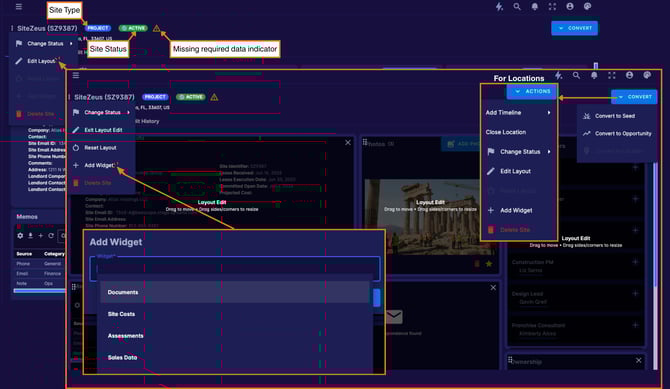
At the top of the page, you’ll see the site name, site type, current status, any missing required data, and the site address. The remainder of the page is built using customizable widgets, which you can add, remove, resize, and rearrange to create a layout that fits your workflow. While each user can personalize their own layout, that layout will apply consistently across all sites.
Each widget displays a specific type of site data, allowing you to configure the page so your most important information is always front and center. Widgets are permission-based, making it easy to tailor visibility by user role and create a customized experience for different teams.
You can edit or reset your layout from the three-dot menu in the top left corner. From this same menu, you can also change the site status (Active, Dead, On Hold, or For Sale), add a timeline, or close a location. For Locations, these actions are also available through the Actions button in the top right. For all other site types, this menu appears as the Convert button, allowing you to move the site into another stage of the pipeline.
The Site Landing Page gives clients a flexible, role-based workspace where all critical site information lives in one place. By allowing teams to customize layouts, control access, and quickly take action, this helps reduce friction, improve visibility, and keep everyone aligned as sites move through the development lifecycle.
Need Help?
If you have questions or feedback about any of these features, please contact support using the in-app chat. Thanks for reading!