![SiteZeus-Logo-MARK.png]](https://help.sitezeus.com/hs-fs/hubfs/Hubspot%20Assets/SiteZeus-Logo-MARK.png?height=40&name=SiteZeus-Logo-MARK.png)
This widget serves as a centralized repository for all files related to a site.
It allows teams to store, organize, and access important documents directly from the site landing page. A standard folder structure can be applied across all sites to maintain consistency, if desired. You can get this set up by contact support with your desired structure. Documents can be upload by dragging the files directly into the widget.
You can navigate into folders by selecting the folder name and return to the parent level using the arrow or the two-dots (..) at the top of the widget. Selecting a file will automatically download it to your local device.
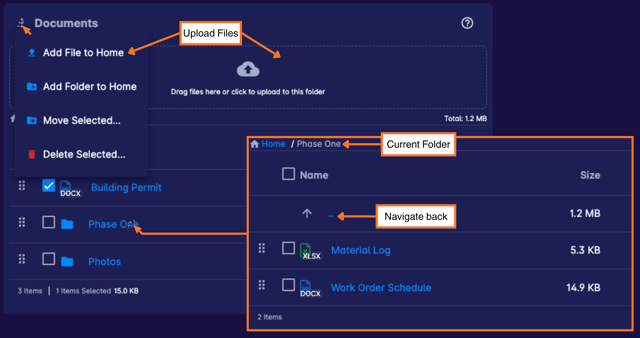
The Documents widget keeps all site-related files organized and accessible in one place, reducing the need for external storage or lengthy email searches. By supporting consistent folder structures and simple upload options, it helps clients maintain document clarity, improve collaboration, and ensure critical information is always easy to find.
Need Help?
If you have questions or feedback about any of these features, please contact support using the in-app chat. Thanks for reading!