![SiteZeus-Logo-MARK.png]](https://help.sitezeus.com/hs-fs/hubfs/Hubspot%20Assets/SiteZeus-Logo-MARK.png?height=40&name=SiteZeus-Logo-MARK.png)
The Global Documents Repository is a centralized document management area designed for files that are not associated with a specific site.
It uses the same document management experience as the Documents widget on the Site Landing Page, but operates independently and is governed by its own set of permissions.
This repository is ideal for storing files that should be accessible across the organization, such as templates, standards, reference materials, brand assets, or operational documentation.
Uploading Files
Files can be added to the Global Documents Repository in multiple ways:
-
Drag and drop files directly into the repository
-
Click into a folder and select the upload area to browse and upload files
-
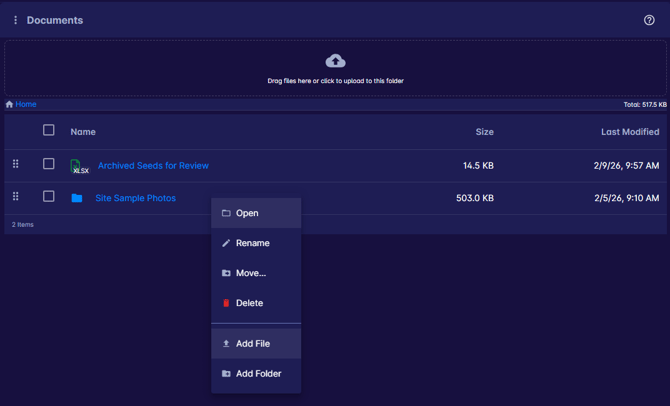
Use the menu options to add files to the current folder
Uploaded files are immediately available to users with access.
Organizing Files and Folders
The Global Documents Repository supports full folder management to help keep files organized.
Users with appropriate permissions can:
-
Create folders
-
Upload files into folders
-
Move selected files or folders
-
Delete selected items
Downloading Files
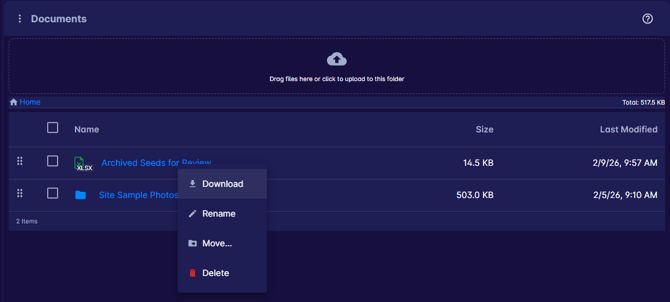
Selecting a file will automatically download it to your local device.
Need Help?
If you have questions about Global Documents permissions, folder setup, or document management, please contact Support using the in-app chat. Thanks for reading!