![SiteZeus-Logo-MARK.png]](https://help.sitezeus.com/hs-fs/hubfs/Hubspot%20Assets/SiteZeus-Logo-MARK.png?height=40&name=SiteZeus-Logo-MARK.png)
Custom Fields allow you to capture and track data that is specific to your business and workflows. They provide a flexible way to extend the platform beyond standard system fields and ensure that the information most important to your organization is always available.
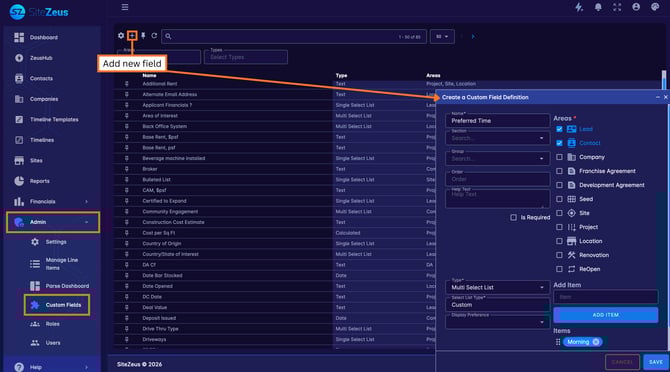
The Custom Field area is location under the Administration tab. From here, you can add a Custom Field by clicking the (+) plus at the top of the page. Custom Fields can be added across many areas of the platform, including Leads, Contacts, Companies, Franchise or Development Agreements, Sites (all or specific site types), Renovations, and ReOpens. This flexibility allows you to tailor data collection based on both object type and use case.
Each Custom Field can be configured using a variety of field formats, including Calculated, Currency, Date, Multi-Select List, Number, Single-Select List, and Text. Fields can be organized into sections, with additional groups within each section, making it easy to structure and surface related information together.
Once applied, Custom Fields are accessible through the Custom Data tab within the relevant record, allowing users to quickly view and update information wherever the field is in use.
Custom Fields give clients the ability to adapt the platform to their unique processes. By capturing business-specific data in a structured, searchable way, teams gain better visibility, consistency, and reporting across their pipeline—while ensuring the platform continues to scale alongside their organization.
Need Help?
If you have questions or feedback about any of these features, please contact support using the in-app chat. Thanks for reading!