![SiteZeus-Logo-MARK.png]](https://help.sitezeus.com/hs-fs/hubfs/Hubspot%20Assets/SiteZeus-Logo-MARK.png?height=40&name=SiteZeus-Logo-MARK.png)
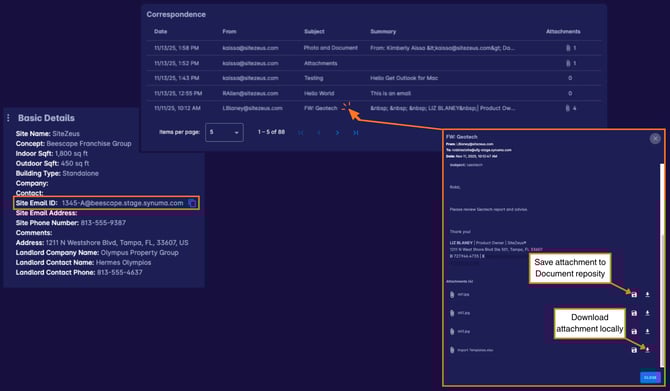
This widget displays all emails sent to a site’s unique email address, including any attachments providing a centralized record of communication related to the site.
The site's email address can be found in the Basic Details widget. This is assigned when the site is created, but can be changed, if preferred, as long as the email id is unique. For each email, you can view key details such as the send date, sender, subject line, email body, and the number of attachments. Selecting an email will open the full message for review.
When an email includes attachments, you can choose to download the file locally or save it directly to the site’s document repository, keeping important files organized and easy to access.
By capturing all site-related email communication in one place, the Correspondence widget helps clients maintain context and continuity across teams. It reduces reliance on individual inboxes, preserves important conversations, and ensures attachments are never separated from the site they belong to.
Need Help?
If you have questions or feedback about any of these features, please contact support using the in-app chat. Thanks for reading!