![SiteZeus-Logo-MARK.png]](https://help.sitezeus.com/hs-fs/hubfs/Hubspot%20Assets/SiteZeus-Logo-MARK.png?height=40&name=SiteZeus-Logo-MARK.png)
This widget displays all assessments associated with a site, along with any responses that have been submitted providing a clear view of assessments activity and results directly from the site landing page.
To complete an assessment, select Take Assessment next to the desired assessment name. This will open the assessment in a new window to be completed.
All started and completed assessments appear in the assessment history, which includes:
- Assessment name
- Assigned participant
- Submission date
- Score
- Status
- Last updated date
Submitted assessments can be received at any time using the View button located on the right side of the widget.
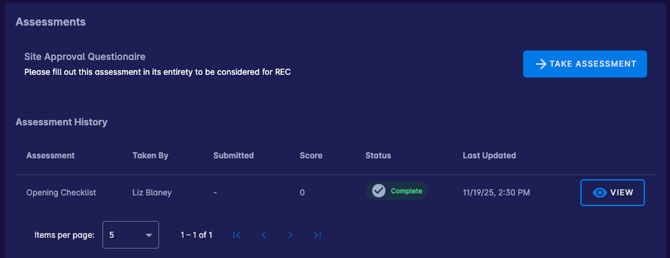
The Assessments widget gives clients visibility into evaluation progress and outcomes without leaving the site record. By keeping assessment history, scores, and statues centralized, teams can make informed decisions, track accountability, and ensure required evaluations are completed consistently across sites.
Need Help?
If you have questions or feedback about any of these features, please contact support using the in-app chat. Thanks for reading!